Digital Decluttering: A 5-Day Plan to Streamline Your Online Presence and Boost Efficiency

Anúncios
In our increasingly connected world, the sheer volume of digital information, accounts, and notifications can feel overwhelming. What was once designed to make our lives easier can often lead to stress, distraction, and decreased productivity. This phenomenon, often termed ‘digital clutter,’ can manifest in overflowing inboxes, forgotten subscriptions, disorganized files, and an overall sense of being constantly ‘on.’ The good news? Just like a physical space, your digital life can be decluttered and organized. This article will guide you through a comprehensive digital decluttering plan, spread over five days, designed to streamline your online presence, boost efficiency, and reclaim your peace of mind.
Anúncios
The concept of digital decluttering isn’t just about deleting old files; it’s about intentionally curating your digital environment to serve your goals, reduce distractions, and enhance your digital well-being. By following this structured digital decluttering plan, you’ll systematically tackle different aspects of your digital life, turning chaos into calm. We’ll cover everything from email management and cloud storage to social media and digital subscriptions, providing actionable steps for each day. Prepare to transform your digital landscape and experience a newfound sense of control and clarity.
Why Embrace a Digital Decluttering Plan?
Before diving into the how-to, let’s understand the profound benefits of adopting a robust digital decluttering plan. The digital realm, while offering unparalleled convenience and access to information, also presents unique challenges to our focus and mental health. A cluttered digital life can lead to:
- Increased Stress and Anxiety: Constant notifications, an overflowing inbox, and the pressure to keep up with every digital trend can take a significant toll on your mental well-being.
- Reduced Productivity: Searching for files, sifting through irrelevant emails, or getting sidetracked by social media can severely impact your ability to focus on important tasks.
- Wasted Time: How much time do you spend managing digital chaos rather than engaging in meaningful work or leisure?
- Security Risks: Old accounts, unused apps, and weak passwords create vulnerabilities in your digital security.
- Information Overload: The sheer volume of digital content can make it difficult to process information effectively and retain what’s truly important.
- Financial Drain: Forgotten subscriptions can silently eat away at your budget.
By implementing a structured digital decluttering plan, you are not just tidying up; you are investing in your mental clarity, productivity, and overall digital wellness. This plan is designed to be manageable, breaking down a seemingly daunting task into achievable daily steps.
Anúncios
Day 1: Taming the Email Beast and Digital Files
Email Inbox Zero: A Fresh Start
The email inbox is often the epicentre of digital clutter. It’s where communication, tasks, marketing, and personal messages converge, often leading to a sense of overwhelm. Day 1 of your digital decluttering plan focuses on conquering your inbox and organizing your digital files.
Actionable Steps for Email:
- Unsubscribe Relentlessly: Go through your inbox and identify newsletters and promotional emails you no longer read or find useful. Use tools like Unroll.Me or just manually click the ‘unsubscribe’ link at the bottom of the emails. Be ruthless!
- Delete, Archive, or Act: For every email, apply the ‘four D’s’ rule: Delete (if useless), Do (if it takes less than 2 minutes), Delegate (if someone else can do it), or Defer (if it requires more time, move it to a ‘To Do’ folder).
- Create Smart Folders/Labels: Set up a logical folder structure for emails you need to keep (e.g., ‘Receipts’, ‘Projects’, ‘Personal’, ‘Important’). Use rules or filters to automatically sort incoming emails into these folders.
- Schedule Email Time: Instead of constantly checking emails, designate specific times during the day to process them. This prevents constant distraction.
- Respond Promptly (or not at all): If an email can be answered quickly, do it. If it requires a longer response, schedule time for it. If it doesn’t require a response, archive it.
Organizing Digital Files: A Clean Slate
Next, let’s tackle your computer’s hard drive and cloud storage. Disorganized files can waste valuable time and create unnecessary stress. This part of the digital decluttering plan is crucial for long-term efficiency.
Actionable Steps for Digital Files:
- Consolidate and Backup: Bring all scattered files (desktop, downloads, external drives) into one central location. Ensure you have a robust backup strategy in place (e.g., external hard drive, cloud service).
- Delete Duplicates and Unnecessary Files: Use file clean-up tools or manually go through folders to identify and delete old downloads, duplicate photos, and documents you no longer need.
- Create a Logical Folder Structure: Organize your files into a hierarchical structure that makes sense to you. Common categories include ‘Work’, ‘Personal’, ‘Finances’, ‘Photos’, ‘Documents’. Within these, create subfolders (e.g., ‘Work/Projects/ProjectX’, ‘Personal/Travel/2023_Trip’).
- Consistent Naming Conventions: Adopt a clear and consistent naming convention for your files (e.g., ‘YYYY-MM-DD_ProjectName_DocumentType.pdf’). This makes searching much easier.
- Empty Your Desktop: Aim for a minimalist desktop with only essential shortcuts or temporary files. Move everything else into your organized folder structure.
Day 2: Conquering Social Media and Notifications
Social media, while a powerful tool for connection and information, can also be a significant source of digital clutter and distraction. Day 2 of your digital decluttering plan focuses on curating your social media feeds and managing notifications to reclaim your attention.
Social Media Audit: Curating Your Feed
It’s time to be intentional about who and what you allow into your digital feed. This isn’t about quitting social media entirely (unless you want to!), but about making it a more positive and productive experience.
Actionable Steps for Social Media:
- Unfollow/Unfriend/Mute: Go through each social media platform. Unfollow accounts that no longer inspire you, make you feel bad, or provide irrelevant content. Unfriend dormant accounts or those you no longer connect with. Use the ‘mute’ feature for people you can’t unfollow but want to see less of.
- Review Privacy Settings: Check and update your privacy settings on all platforms. Ensure you’re only sharing what you intend to with your desired audience.
- Delete Old Posts/Photos: Remove any old posts, photos, or information you no longer want associated with your online persona. This is particularly important for professional reasons.
- Limit Your Platforms: Do you really need to be active on every platform? Consider deleting accounts for platforms you rarely use or find little value in.
- Schedule Social Media Time: Similar to email, avoid mindlessly scrolling. Designate specific times to check social media, and use app timers if necessary to limit usage.
Notification Management: Reclaiming Focus
Notifications are constant interruptions that fragment our attention. A key part of any good digital decluttering plan is to take control of these digital pings.
Actionable Steps for Notifications:
- Turn Off Non-Essential Notifications: Go into your phone and computer settings. Disable notifications for apps and websites that don’t require immediate attention. Think critically: do you need to know the moment someone likes your Instagram post, or can it wait?
- Utilize Do Not Disturb Modes: Learn to use your device’s ‘Do Not Disturb’ or ‘Focus’ modes during work, sleep, or family time. Set exceptions for truly urgent contacts.
- Batch Notifications: For essential apps (like messaging), consider options that allow you to receive notifications in batches rather than individually.
- Review App Permissions: While in your phone settings, check what permissions each app has (e.g., access to location, microphone, photos). Revoke permissions that aren’t necessary for the app’s core function.
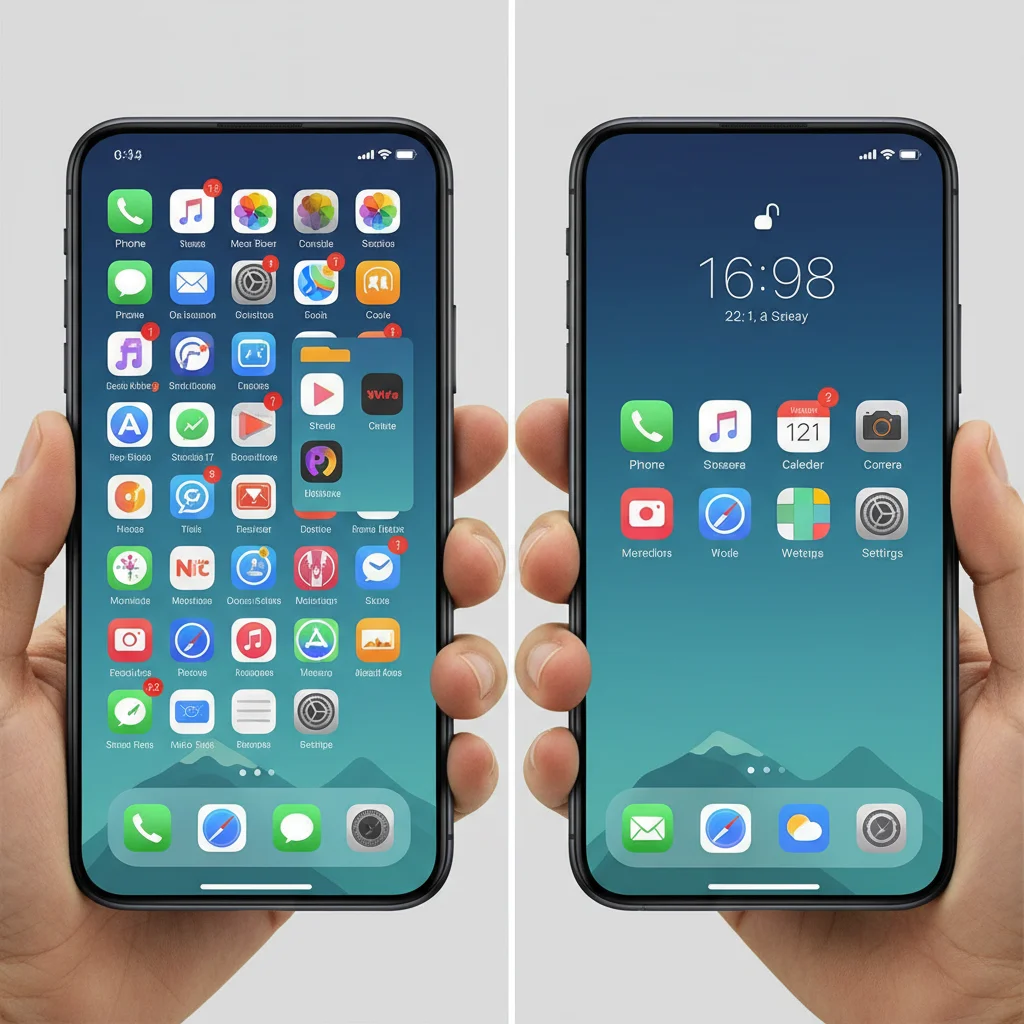
Day 3: App and Software Overhaul
Our devices often accumulate a surprising number of unused apps and software. These not only take up valuable storage space but can also contribute to performance issues and digital distraction. Day 3 of your digital decluttering plan is dedicated to a thorough audit of your applications.
Smartphone Apps: Less is More
Think of your phone’s home screen as prime real estate. Every app should earn its place.
Actionable Steps for Smartphone Apps:
- Delete Unused Apps: Go through every page of your phone. If you haven’t used an app in the last month (or even longer), delete it. Be honest with yourself about its utility.
- Organize Remaining Apps: Group similar apps into folders (e.g., ‘Productivity’, ‘Finance’, ‘Travel’). Place your most frequently used apps on your home screen or in an easily accessible dock.
- Limit Home Screen Apps: Aim for one or two screens of apps. Consider using app libraries or search functions for less frequently accessed applications.
- Review App Permissions: As mentioned before, regularly check and adjust app permissions. Some apps request access to data they don’t truly need.
- Utilize Widgets Wisely: If you use widgets, ensure they are providing useful, glanceable information without creating more clutter.
Computer Software: Streamlining Your System
Just like your phone, your computer can become bogged down with unnecessary programs.
Actionable Steps for Computer Software:
- Uninstall Unused Programs: Go to your computer’s ‘Programs and Features’ (Windows) or ‘Applications’ folder (Mac) and uninstall any software you no longer use. This frees up disk space and often improves system performance.
- Clean Up Browser Extensions: Browser extensions can be incredibly useful, but too many can slow down your browser and even pose security risks. Review and remove any extensions you don’t actively use.
- Optimize Startup Programs: Many programs automatically launch when your computer starts, slowing down your boot time. Adjust your startup settings to only include essential applications.
- Run Disk Cleanup: Use your operating system’s built-in disk cleanup tools to remove temporary files, recycle bin contents, and other unnecessary data.
Day 4: Digital Subscriptions and Online Accounts
Over time, we accumulate a multitude of online accounts and subscriptions, many of which are forgotten, unused, or even draining our finances. Day 4 of your digital decluttering plan focuses on auditing these digital commitments.
Subscription Audit: Financial and Digital Freedom
This step can often uncover surprising financial savings and reduce your digital footprint.
Actionable Steps for Subscriptions:
- List All Subscriptions: Go through your bank statements and credit card bills from the last 6-12 months. List every recurring charge, especially those for streaming services, software, apps, and online memberships.
- Identify and Cancel Unused Subscriptions: For each subscription, ask yourself: Do I use this regularly? Does it provide significant value? Can I get similar benefits for free or cheaper? Be honest. Cancel anything that doesn’t meet your criteria.
- Negotiate or Downgrade: For subscriptions you want to keep, check if there are cheaper plans or if you can negotiate a better deal.
- Set Reminders: For annual subscriptions, set a calendar reminder a month before renewal to re-evaluate if you still need it.
Online Account Cleanup: Security and Simplicity
Every online account you have, especially those you no longer use, represents a potential security risk. This part of your digital decluttering plan enhances your digital security and simplifies your online presence.
Actionable Steps for Online Accounts:
- List All Online Accounts: This can be challenging. Start by checking your saved passwords in your browser or password manager. Think about old forums, shopping sites, or services you signed up for years ago.
- Delete or Deactivate Unused Accounts: For accounts you no longer need, go to the website and look for options to ‘delete account,’ ‘close account,’ or ‘deactivate account.’ Be aware that some services make this difficult, but persist.
- Update Passwords for Active Accounts: For accounts you keep, ensure you are using strong, unique passwords. A password manager is highly recommended for this.
- Enable Two-Factor Authentication (2FA): Where available, enable 2FA on all important accounts (email, banking, social media, cloud storage). This adds a critical layer of security.
- Review Connected Apps: Many services allow third-party apps to connect to your account (e.g., Facebook logins for other apps). Review these connections and revoke access for anything you don’t recognize or no longer use.

Day 5: Digital Wellness and Future Maintenance
Congratulations on making it to Day 5 of your digital decluttering plan! Today is about consolidating your efforts, establishing new habits, and planning for ongoing digital wellness. Decluttering is not a one-time event; it’s an ongoing process.
Establishing Digital Wellness Habits
Now that your digital space is cleaner, it’s time to put practices in place to keep it that way and foster a healthier relationship with technology.
Actionable Steps for Digital Wellness:
- Implement Regular Review Sessions: Schedule a monthly or quarterly ‘digital declutter’ session. This could be an hour to review new subscriptions, clean out your downloads folder, or unsubscribe from new newsletters.
- Digital Detox Periods: Consider implementing regular digital detoxes – even short ones. This could be an hour before bed, one day a week, or a weekend away from screens.
- Mindful Technology Use: Before opening an app or website, ask yourself: What is my intention? Am I seeking information, connection, or just mindlessly scrolling? This awareness can help curb unproductive habits.
- Create a Digital Downtime Routine: Establish a routine that signals the end of your digital day. This might involve putting your phone away, reading a physical book, or engaging in a hobby.
- Educate Yourself on Cybersecurity: Stay informed about the latest cybersecurity threats and best practices. A strong digital decluttering plan should always include an element of digital security.
Optimizing for Future Efficiency
Beyond decluttering, think about how you can proactively optimize your digital environment.
Actionable Steps for Future Efficiency:
- Automate Where Possible: Use tools to automate tasks like file organization, email filtering, or cloud backups.
- Utilize Productivity Tools: Explore project management apps, note-taking software, or calendar tools that genuinely enhance your workflow rather than adding to the clutter.
- Learn Keyboard Shortcuts: Mastering keyboard shortcuts for your most used applications can significantly speed up your work.
- Set Up a Password Manager: If you haven’t already, invest in a reputable password manager. It’s a game-changer for security and convenience.
- Review Your Digital Goals: Periodically reflect on how your digital tools are serving your personal and professional goals. Adjust your setup as needed.
Maintaining Your Decluttered Digital Life
The success of this digital decluttering plan hinges on consistency. Think of it not as a one-time clean-up, but as establishing a new baseline and incorporating healthier digital habits into your routine. Just as you regularly clean your physical home, your digital spaces require ongoing attention. Here are some strategies for long-term maintenance:
- The ‘One-In, One-Out’ Rule: When you subscribe to a new newsletter or download a new app, consider unsubscribing from an old one or deleting an unused app. This prevents accumulation.
- Regular Archiving: Instead of deleting everything, consider archiving older projects, emails, or photos that you might need for reference but don’t require immediate access. Cloud storage is excellent for this.
- Batch Processing: Dedicate specific times for tasks like unsubscribing from emails, organizing downloads, or reviewing social media feeds. This prevents these tasks from becoming overwhelming.
- Digital Detox Days: Intentionally unplug for a few hours or a full day periodically. This helps reset your relationship with technology and reminds you of the value of offline experiences.
- Educate Yourself: Stay updated on new digital tools and best practices for organization and security. The digital landscape is constantly evolving, and so should your approach to managing it.
By integrating these maintenance practices, your digital decluttering plan becomes a sustainable lifestyle choice, ensuring that your digital environment remains a tool for empowerment, not a source of stress.
Conclusion: A Lighter, More Efficient Digital You
Completing this 5-day digital decluttering plan is a significant achievement. You’ve taken concrete steps to transform your digital chaos into a streamlined, efficient, and more enjoyable online presence. From a tidier inbox and organized files to a curated social media feed and secure online accounts, you’ve laid the groundwork for a healthier digital life. The benefits extend beyond mere organization; you’ll likely experience reduced stress, improved focus, enhanced productivity, and a greater sense of control over your technology.
Remember, this is just the beginning. Digital decluttering is an ongoing journey. By adopting the maintenance habits outlined in this guide, you can ensure that your digital environment continues to serve you, rather than becoming a source of overwhelm. Embrace the freedom and clarity that comes with a decluttered digital life, and enjoy a more intentional and productive relationship with technology. Your future, more efficient self will thank you for embarking on this comprehensive digital decluttering plan.